What the workflow does
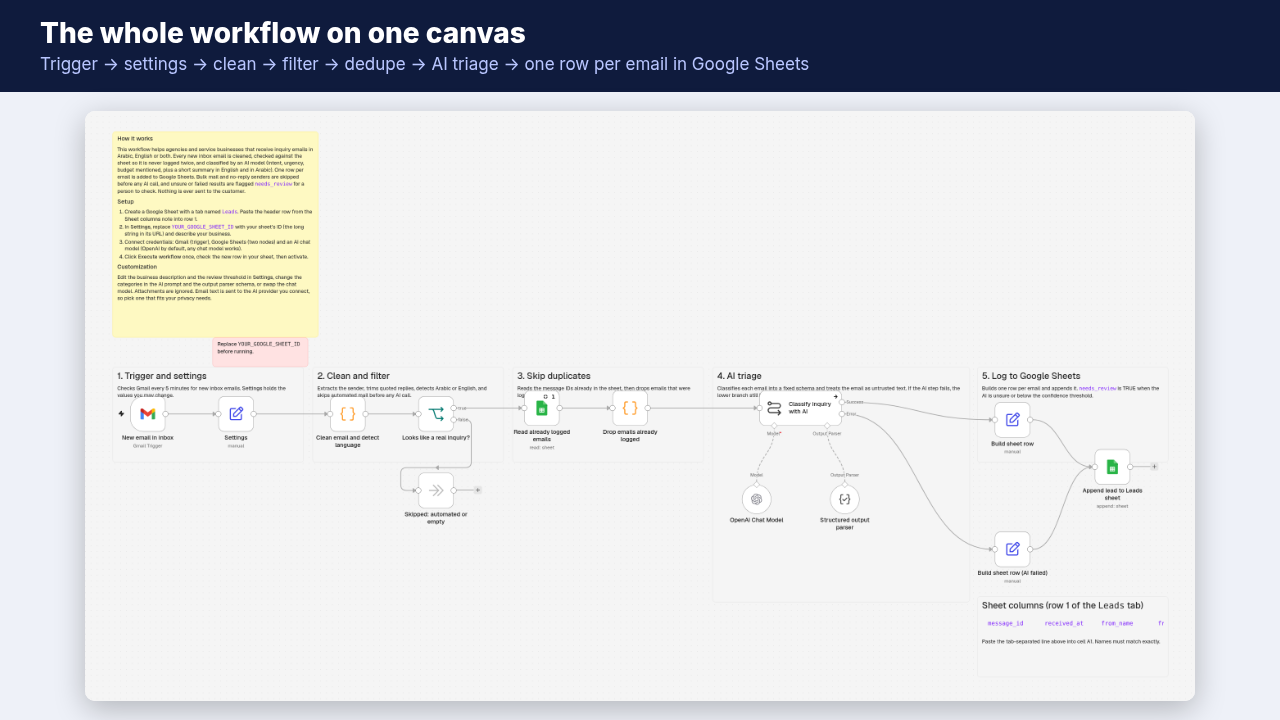
It watches a Gmail inbox every five minutes, cuts quoted replies, skips newsletters, no-reply senders, bounces and empty mail before any AI call, drops emails already in the sheet, then classifies each real inquiry. Unsure results are flagged needs_review. If the AI step fails, the email is still logged with intent = unclassified.
1. Trigger
New mail in the inbox, plus a Settings node for your sheet and business description.
2. Clean
Sender, subject, trimmed body, language hint (Arabic, English or mixed).
3. Filter
Skip automated mail. Drop Gmail message IDs already in the sheet.
4. Classify
Intent, urgency, budget as written, summaries in English and Arabic, confidence.
5. Log
Append one row. Nothing is sent back to the customer.
Try a sample
Pick a message to see the input and the output the workflow produces. Sample bodies follow the official setup-guide tests. Times are shown in Africa/Cairo (UTC+2).
How these outputs were produced
Cleaning, language detection, junk skipping and duplicate dropping were produced by running the workflow’s Code nodes on these samples. Sheet columns follow the Build sheet row and Build sheet row (AI failed) nodes, including the documented low-confidence rule: confidence 0.40 is below the 0.6 threshold, so needs_review becomes TRUE with the reason “Low confidence (0.40)”. The AI classification fields are recorded stubs of the structured output parser (same schema the template returns). This page does not call a live model, Gmail or Google Sheets. Names and addresses are made up.