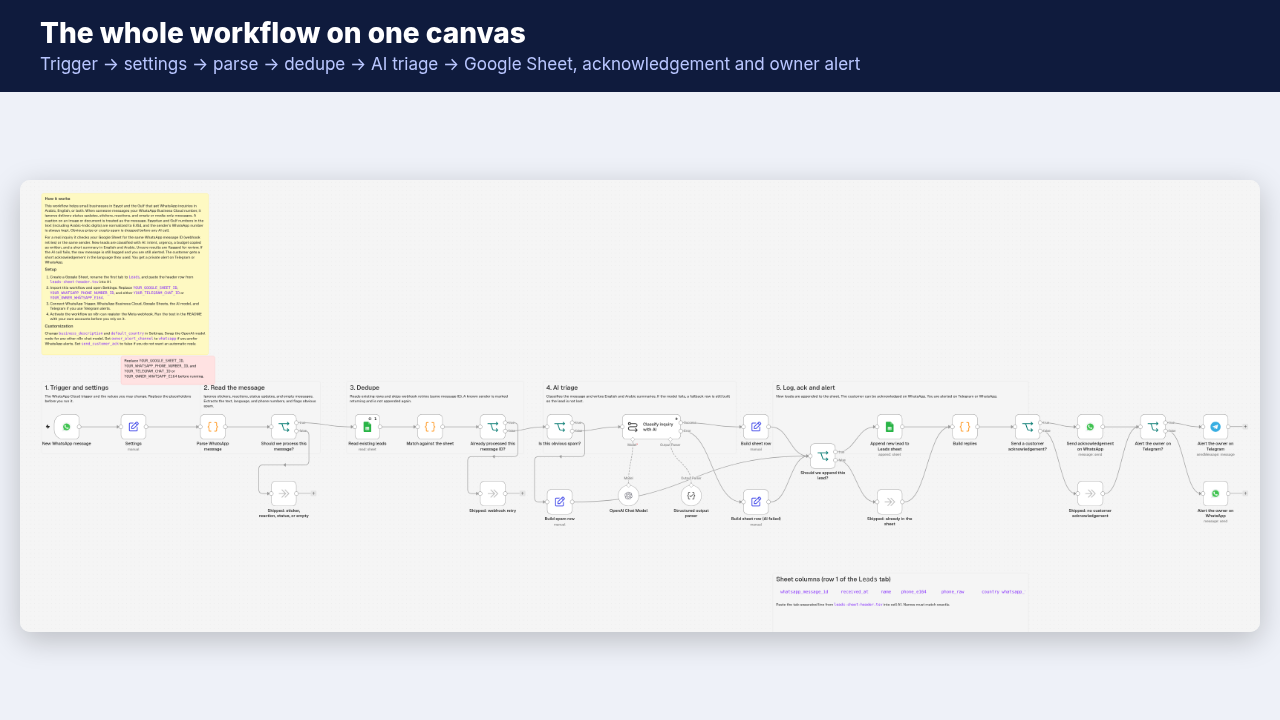
What the workflow does
It watches a WhatsApp Business Cloud number, ignores stickers, reactions, delivery receipts and empty messages, flags obvious prize or crypto spam before any AI call, normalises Egyptian and Gulf numbers (including Arabic-Indic digits) to E.164, and turns each new inquiry into one sheet row. A known sender is marked returning: you are still alerted, but a second lead row is not created. The customer can get a short acknowledgement in the language they used.
1. Trigger
New WhatsApp message, plus Settings for your sheet, number and alert channel.
2. Parse
Language, name, phone in E.164, Egypt and Gulf country. Captions count as text.
3. Filter
Ignore stickers and receipts. Skip retries. Flag obvious spam. Mark returning senders.
4. Classify
Intent, urgency, budget as written, summaries in English and Arabic.
5. Log and notify
Append a new lead, acknowledge the sender, alert you on Telegram or WhatsApp.
Try a sample
Pick a message to see the input and the output the workflow produces. Arabic and English lead summaries match the sample sheet shipped with the product. Acknowledgements and alerts come from the workflow’s Build replies node. Times are shown in Africa/Cairo (UTC+2).
How these outputs were produced
Parsing, phone normalisation, spam and duplicate routing, acknowledgements and owner alerts were produced by running the workflow’s Code nodes — the same stubbed tests used for the product (Arabic-Indic digits, a Saudi caption, sticker, reaction, empty message, delivery status, obvious spam, webhook retry and a returning sender). Spam and AI-failure row text comes from the workflow Set nodes. The Arabic and English lead summaries and intents match the published sample-sheet screenshot. AI classification fields on the other leads are recorded stubs of the structured output parser. This page does not call a live WhatsApp webhook, Google Sheet or model. Names and numbers are made up.